


Reference photos guide NeonSnap toward your exact look, from a new hairstyle to a specific makeup style. Here’s how to know when to upload one, match pose and angle, and pick quality that leads to hyper-real results.
Understanding Reference Photos
When, How & Quality Tips
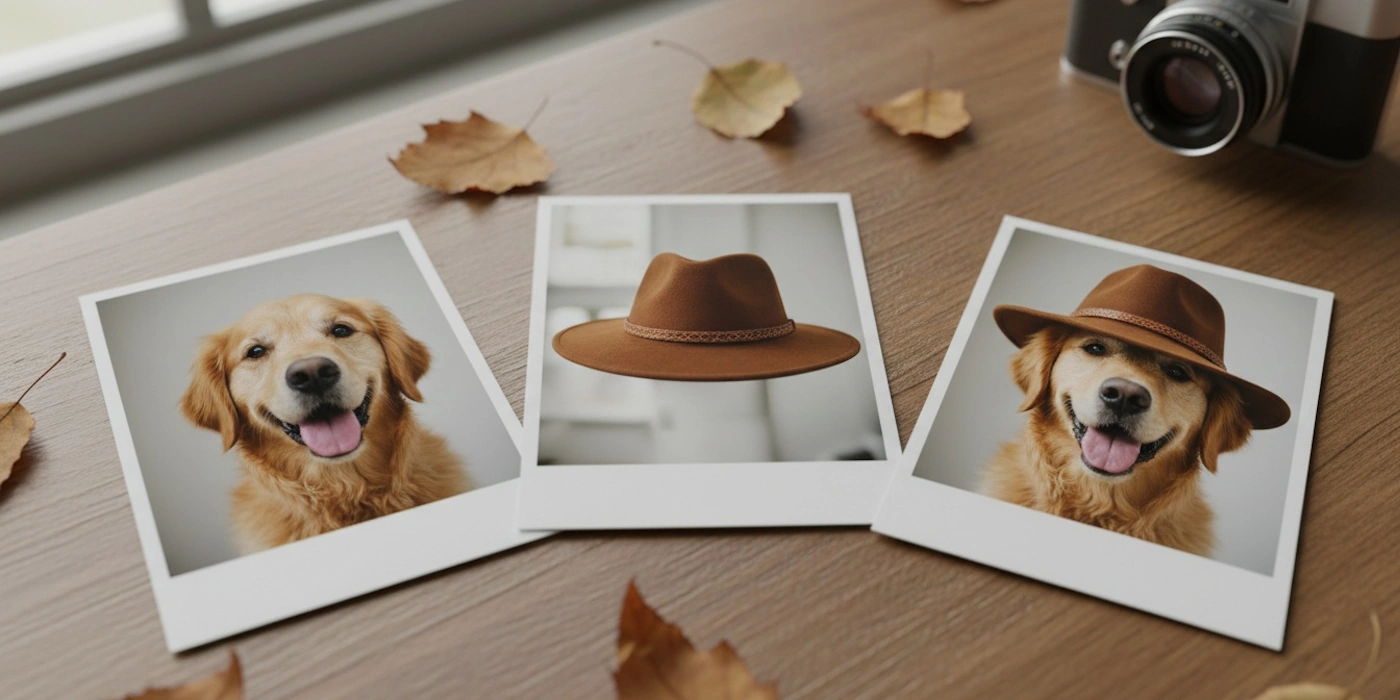
Prompts describe intent. Reference photos define specifics. When you show NeonSnap a clear visual target, you reduce guesswork and increase realism, especially for detailed requests like hairstyles, makeup looks, clothing textures, or background styles.
Think of a reference as a compass: your prompt sets the direction, and your reference keeps the AI on the path.
1. When Should You Upload a Reference?
Use a reference when:
- You want a specific hairstyle or cut (e.g., “long layered shag with curtain bangs”).
- You’re matching a distinct makeup style (e.g., dewy skin + brown smoked liner).
- You need precise clothing details (e.g., “satin emerald slip dress with cowl neck”).
- You're recreating a particular background/aesthetic (e.g., “neon Tokyo alley at night”).
check_circle
Great use: “Match this reference bob haircut exactly; same length and parting.”
cancel
Less useful: “Make it nicer.” (No reference needed. Use a descriptive prompt instead.)
2. Match Pose & Angle (It’s a Multiplier)
For hair, hats, earrings, or collars, the view angle of your source photo should be close to your reference: front, 3/4, or profile. Poses affect visibility of hair length, parting, and symmetry.
- Angle: Align camera height (eye level vs. top-down), head tilt, and rotation.
- Pose: Keep shoulder orientation similar to avoid mismatched drape and shadows.
- Distance: Match tightness of the crop. Close-up hair references work best for hair changes.
Tip: If your source is 3/4 view, choose a 3/4 reference; profiles rarely map cleanly to frontal sources.
3. Lighting & Colour Consistency
Lighting direction and colour temperature drive realism. If your source has warm window light from the left, a cool blue studio reference from the right will fight the edit.
- Direction: Left/right and top/bottom, keep it consistent across source and reference.
- Quality: Soft vs. hard light changes texture (flyaways, skin detail, fabric sheen).
- Temperature: Warm (golden) vs. cool (blue), aim to match within a small range.
wb_twilight Mention in your prompt: “light from left, soft, warm.”
4. Resolution, Sharpness & Clean Edges
Low-res or compressed references blur crucial cues (strand edges, makeup edges, fabric weaves). Upload the highest quality you can.
- Resolution: Aim for at least 1200px on the short side; avoid screenshots if possible.
- Sharpness: Subtle sharpening is fine; heavy sharpening or filters can mislead the model.
- Compression: Avoid blocky JPEG artifacts around hair and high-contrast areas.
Crop out irrelevant borders or UI chrome before uploading.
5. Framing, Crop & Background Noise
Busy references add conflicting signals. Keep your reference tight on the feature you’re changing (hair, makeup, etc.). Neutral or softly blurred backgrounds help.
- Framing: Fill the frame with the relevant area.
- Crop: Match how close the subject appears vs. your source photo.
- Background: Avoid harsh patterns that echo onto hair/edges.
6. Example: Changing Your Hairstyle with a Reference
Say you want your photo to have the hairstyle from a reference image. Upload your source portrait and the hair reference, then use a prompt like:
chat
Prompt: “Same person and pose. Match the reference medium bob with soft layers and curtain bangs. Keep natural chestnut brown, subtle shine, tidy edges around ears. Light from left, soft, warm.”
- Identity lock: “Same person and pose” prevents face drift.
- Transfer specifics: Length, layering, parting, finish (matte vs. glossy).
- Lighting match: Reiterate direction and warmth to integrate hair realistically.
7. Refine & Compare
Iterate in small steps and compare versions side-by-side. Adjust warmth, shadow softness, or strand neatness instead of rewriting from scratch.
- “Increase warmth slightly” → integrates hair tone with skin better.
- “Softer shadows around jawline” → reduces cutout feel.
- “Tidy flyaways near parting” → cleaner finish for print/social.
Common Reference Mistakes (and Fixes)
- Mismatched angle: Pick a reference with similar head turn and camera height.
- Opposite lighting: Flip or choose a reference with matching direction/temperature.
- Over-filtered reference: Use natural textures; avoid heavy skin-smoothing.
- Cluttered background: Crop tighter to the subject feature.
Pro Tips for Reference Wins
- One reference per change: Use separate references for hair vs. makeup to avoid mixed cues.
- Name your intent: In prompts, explicitly say “match the reference hairstyle.”
- Consider gloss & texture: Mention “natural shine” or “matte” to control finish.
Conclusion: Let Your Reference Do the Heavy Lifting
References make your edits more predictable and lifelike. Choose images that match pose, angle, lighting, and crop, then guide NeonSnap with a clear prompt. For targeted changes like hair, the right reference can be the difference between “nice” and “wow”.
Frequently Asked Questions
Do I always need to upload a reference photo on NeonSnap?
No. Reference photos are optional and most useful when you have a specific style in mind, such as a particular haircut, makeup look, or clothing item. For more general edits or style explorations, a well-written text prompt alone is often enough.
What makes a good reference photo?
A good reference photo is well-lit, sharp, and tightly cropped around the feature you want to change. It should have a clean or neutral background, minimal compression artifacts, and no heavy filters. The higher the resolution and the cleaner the edges, the more accurately NeonSnap can reproduce the detail in your edit.
Does the angle of my reference photo matter?
Yes, significantly. For the best results the camera angle and head position in your reference should closely match your source photo. A front-facing reference works best with a front-facing source, and a three-quarter reference with a three-quarter source. Mismatched angles can cause unnatural draping, asymmetry, or inaccurate length rendering.
Why does my reference photo result look unnatural?
The most common causes are mismatched lighting direction, a reference taken from a very different angle to your source, or a low-quality reference with heavy compression or filters. Try choosing a reference that matches the lighting temperature and direction of your source photo, and make sure the angles align as closely as possible.
Can I use more than one reference photo at a time?
For the clearest results it is best to use one reference per feature. Using a single reference for hair and a separate session for makeup avoids mixed signals that can confuse the AI. If you need to change multiple features, tackle them one at a time for the most predictable and realistic output.
Ready to see the difference a reference makes?
Try out NeonSnap's AI tools using your own reference photos today.
Try NeonSnap free →