 £2.99 for 10 tokens



United States Passport Photo Maker
Official 2 x 2 inch (51 x 51 mm) size, plain white background, made online from a selfie.
Upload a photo from your phone and we size it to the US passport or visa photo requirements, replace the background, and check it against the rules below. Use it for US passport, passport card, visa and Green Card photos. Change country.
Before you upload
- Face the camera, neutral expression, mouth closed.
- Stand about a metre from a plain wall if you can. We will fix the background anyway.
- No hats, no sunglasses, hair off your face.
- Leave space above your head and include your shoulders.
United States passport photo size and requirements
| Photo size | 2 x 2 inch (51 x 51 mm) |
|---|---|
| Head height (chin to crown) | 25 to 35 mm |
| Background colour | plain white |
| Digital file | 600 DPI JPEG, 1205 x 1205 pixels |
| Print template | 4 x 6 in sheet, multiple copies with cut lines |
| Used for | US passport, passport card, visa and Green Card photos |
United States passport photo rules
- Face the camera straight on with a neutral expression and your mouth closed.
- Eyes open and clearly visible, no hair across the eyes.
- No sunglasses or tinted lenses. Avoid glare on glasses.
- No hats or head coverings, unless worn for religious or medical reasons.
- Even lighting with no shadows on your face or behind you.
- Plain, uniform background with nothing else in the frame.
- Nobody else in the photo. Head and shoulders only.
You get a photo and a passport photo checker report
Sizing the photo is the easy half. The reason people end up back at the photo booth is that something about the photo itself breaks a rule, and you usually find out weeks later when the application bounces. So along with the finished photo and the print sheet, the tool gives you a compliance report: ten checks, each marked pass, warning or fail, with a one-line note on what to change. Green all the way down means print it. A red row means take another photo now, while it costs you nothing.
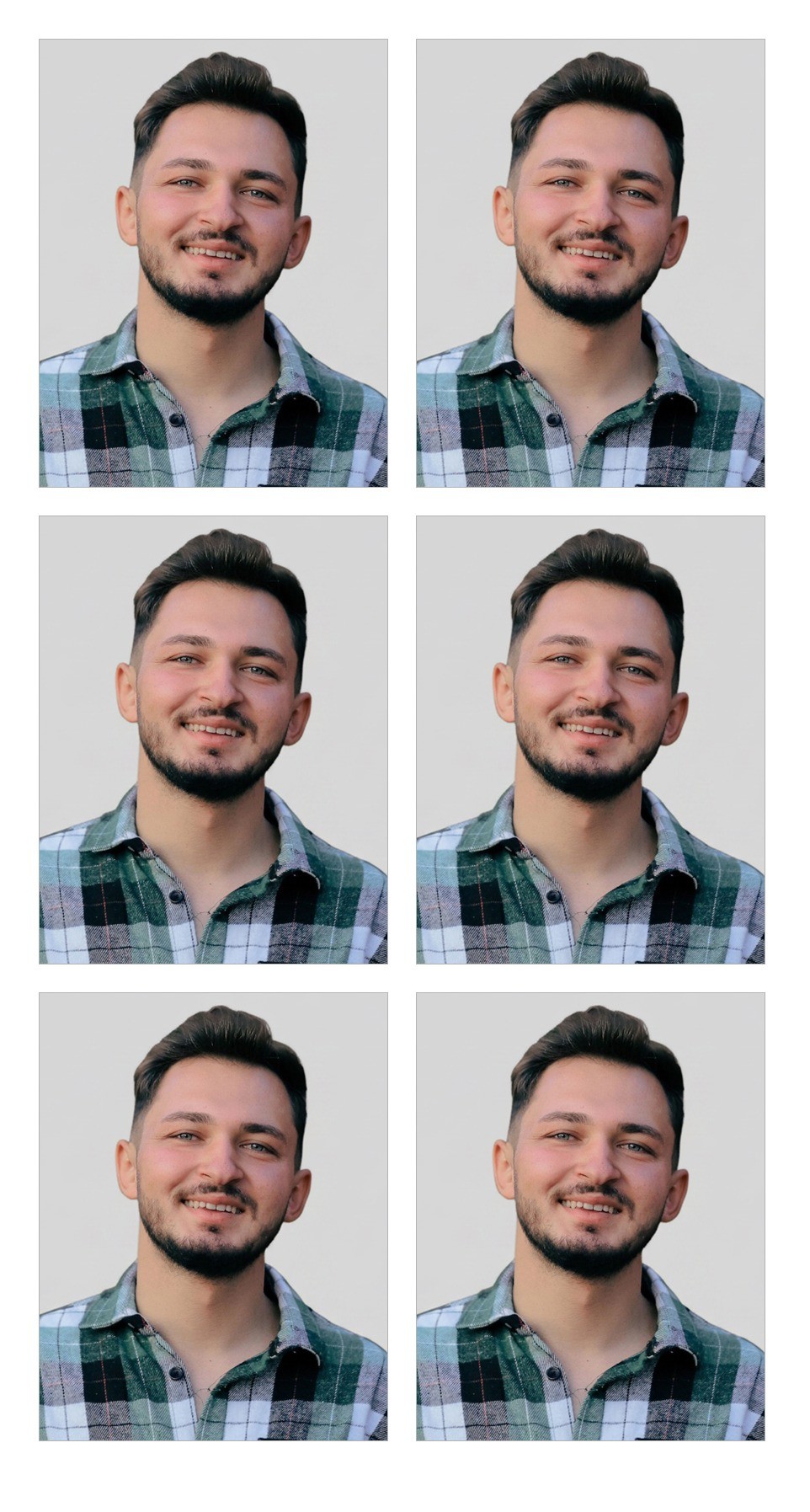
The print sheet is a standard 4 x 6 in photo print with several copies of your photo and thin cut lines, so you can print it at home or at any supermarket photo kiosk for the price of one print.
What the compliance check looks at
Most passport photos get rejected for a handful of boring reasons, and almost all of them are visible before you ever pay for a print. Here is what each of the ten checks means for a United States photo.
- Neutral expression
- Mouth closed, no grin, no raised eyebrows. Teeth showing or an open mouth is a fail, because the face matching software at the border is trained on neutral faces and it is the single most common reason a photo is sent back. A slight closed-mouth smile only gets a warning: most authorities accept it, but neutral is safer.
- Eyes open
- Both eyes open and clearly visible, with no hair across them. A blink, squint or heavy fringe over the eyes is a fail.
- Head straight
- Your head should face the camera squarely, not tilted or turned to one side. Even a small tilt can fail this check, so stand square to the camera and look straight at the lens.
- Glasses
- Glare on lenses is a fail everywhere. Plain glasses without glare are a warning rather than a fail, because the rules differ: the US and UK now ask you to remove them, while several other countries still allow them. The safest answer is to take them off.
- No headwear
- Hats, caps and hoods are not allowed. Religious or medical head coverings are fine as long as your whole face is visible from the bottom of the chin to the top of the forehead, so this one is a warning, not a fail.
- Even lighting
- Shadows across the face or a dark shadow on the wall behind you can get a photo rejected. Facing a window in daylight, with the light source in front of you rather than behind, fixes this in almost every case.
- Plain background
- The background has to be a single plain colour with nothing else in the frame. This is the one check we fix for you: the tool replaces whatever was behind you with the correct flat colour for your country, so you can take the photo in your kitchen. It only shows a warning if that step failed and you should retake the photo against a plain wall.
- Sharp and clear
- Blurry, grainy or low resolution photos print badly and can be refused. Use the main rear camera of your phone rather than the front camera if you can, and make sure the photo is in focus on your eyes.
- Head size in range
- Every country specifies how big your head should be in the finished photo, measured from the bottom of the chin to the top of the head (25 to 35 mm on a 2 x 2 inch (51 x 51 mm) photo). We scale and crop your photo to land inside that range, and this check confirms the result.
- Room around the head
- If you were too close to the edge of the original photo there may not be enough space above your head or beside it once the photo is cropped to size. We pad the missing area with the background colour so you still get a correctly sized photo, but a warning here means it is worth stepping back and taking a new one.
The check is advisory. It catches the problems that account for the large majority of rejections, but the issuing authority makes the final call, so if anything shows red it is worth the thirty seconds it takes to retake the photo.
Frequently asked questions
Can I take a passport photo with my phone?
Yes. Any recent phone camera has more than enough resolution. What matters is the lighting, the expression and leaving enough space around your head, and the tool handles the cropping, the exact size and the background. See the step-by-step guide above.
What size is a passport photo?
It depends on the country. The UK, EU and Australia use 35 x 45 mm. The US and India use 2 x 2 inches (51 x 51 mm). Canada uses 50 x 70 mm. Each country also sets a head height range inside that frame, which is the part most people get wrong when they crop a photo themselves.
Why do passport photos get rejected?
In roughly this order: smiling or an open mouth, shadows on the face, a background that is not plain, glare on glasses, the head too large or too small in the frame, and eyes not clearly visible. Our compliance check flags every one of these before you print.
Can I smile in a passport photo?
No. Every country on this page asks for a neutral expression with your mouth closed. A slight, closed-mouth expression is usually tolerated, but teeth showing is a reliable way to get the photo returned.
Can I wear glasses in a passport photo?
It depends on the country. The United States and United Kingdom ask you to remove them. Most others allow them if there is no glare and the frames do not cover your eyes. If you are not sure, take them off: nobody has ever had a photo rejected for not wearing glasses.
Can I use this for a visa photo, ID photo or driving licence?
Usually, yes. Visa photos almost always share the passport photo size for that country (Schengen visas use 35 x 45 mm, US visas use 2 x 2 inches), and many ID cards and driving licences accept the same photo. Check the exact size your form asks for and pick the matching country page.
Does it work for a baby or child passport photo?
The sizes and head height rules are the same for children, so the photo will be cropped correctly. Most countries relax the expression and eye rules for babies, so treat a warning on those two checks as advice rather than a reason to retake. Nobody else, and no hands, may be visible in the photo.
Does the AI change my face?
No. We only use AI to measure your photo and replace the background. The pixels of your face and hair are copied from your original photo untouched.
Will my photo be accepted?
We size and check it against the published rules, and show you anything that might be a problem. The final decision is always made by the issuing authority, so follow the checklist.
How do I print a passport photo at home?
Download the print sheet. It is a standard 4 x 6 inch (10 x 15 cm) photo print with several copies of your photo and thin grey cut lines, so you can print it on glossy photo paper at home at 100% scale, or send it to any pharmacy or supermarket photo kiosk as a normal 4 x 6 print, then cut along the lines.
Is it free?
Yes. It uses the same free allowance as our other tools, no watermark, and you do not need an account.
 Need a headshot too?
Make a professional LinkedIn headshot
Try it free
Need a headshot too?
Make a professional LinkedIn headshot
Try it free